
Launching March 1, 2027
Maintenance that closes the loop.
taskfield is the CMMS for teams that maintain assets in the field. From the equipment record to the reliability KPI, every work order comes back from the field with data you can act on.

Why we exist
Maintenance isn't fixing broken machines.
It's knowing what you have, planning before the failure, getting to the right site with the right part, and recording why it broke. Tools that only open and close work orders stop halfway. taskfield was designed for the whole way.
How it works
The complete loop, in one platform
Six stages that feed each other. What the technician records today improves tomorrow's plan.
-
Assets
Customer, site, equipment and components, with classes, characteristics and criticality.
-
Plans
Time- or usage-based task plans generate preventive work orders on their own.
-
Routes
The planner spreads the month's work orders by technician and by day, accounting for travel and shift length.
-
Field
Technicians execute in the app, with checklists and evidence, even offline.
-
Close-out
Findings, parts used and failure causes come back coded, not as free text.
-
KPIs
MTBF, MTTR, backlog and SLA compliance calculated from what actually happened.
Features
Built for operations, not for spreadsheets
-
Service calls and dispatch
Step-by-step intake starting from the equipment, nearest technician on the map, and a day board in kanban and timeline views.
-
AI-assisted checklists
Build forms in the form builder, or generate a draft from the paper, Excel or PDF checklist your team already uses.
-
Technical catalog
Models, parts, tools and PPE organized by equipment class and linked to work orders.
-
Maintenance KPIs
An operations dashboard with MTBF, MTTR, backlog, on-time preventives and SLA by customer.
-
Integrations and API
Versioned API and webhooks to connect ERPs, legacy systems and monitoring devices.
-
Multi-company, multi-country
Portuguese, Spanish, English and German, with no single country's rules hard-wired into the screens.
Artificial intelligence
Maintenance that learns.
Technicians do the work. AI learns from every closed work order and sends improvements and watch points back to the planners.
Technicians execute
Checklists, photos and readings captured in the app, even offline.
- Checklists
- Photos
- Readings
Structured history
Every work order comes back with the asset, coded failure, parts and time.
- Coded failure
- Parts
- Time
Learns from history
Cross-checks work orders, readings and failures across all assets to find patterns.
- Patterns
- Trends
- Repeat failures
Suggests and alerts
Improvements and watch points reach the planner, who makes the call.
- Watch pointChiller 2 · vibration up 18% in 30 days
- Suggested improvementElevator 14 · preventive can move from monthly to bimonthly
- Repeat failureAurora Bldg. door · 4 failures in 60 days
The adjusted plan goes back to the field
AI that turns work orders into decisions
Every work order closed in taskfield records the asset, symptom, cause, parts, readings and time. AI reads that entire history and shows where to act: the equipment about to fail, the plan that needs to change, the failure that keeps coming back. Continuous improvement no longer depends on someone finding time to dig through spreadsheets.
-
Ask your data
Ask in plain language, like “which elevators had the most service calls this quarter?”, and get the answer with the numbers and the source work orders.
-
Failure codes that organize themselves
AI suggests symptom, cause and action from what the technician wrote, groups similar failures and shows the Pareto of the costliest ones.
-
Predictive from your readings
Temperature, vibration, current, hour meters and telemetry via API: AI tracks the trend and warns you before a value crosses its limit.
-
Preventive plans that adjust
Based on real history, AI points out which preventive task can be spaced out and which should come sooner, asset by asset.
-
Field records, summarized
Notes, photos and checklists from hundreds of visits become a per-asset summary, with repeat issues and open items highlighted.
-
Risk-based priorities
A backlog ranked by asset criticality, failure history and SLA impact, so planners can decide what comes first.
AI suggests, your team decides. Every recommendation shows the data behind it and can be accepted, adjusted or dismissed.
Technician app
The app technicians actually want to open
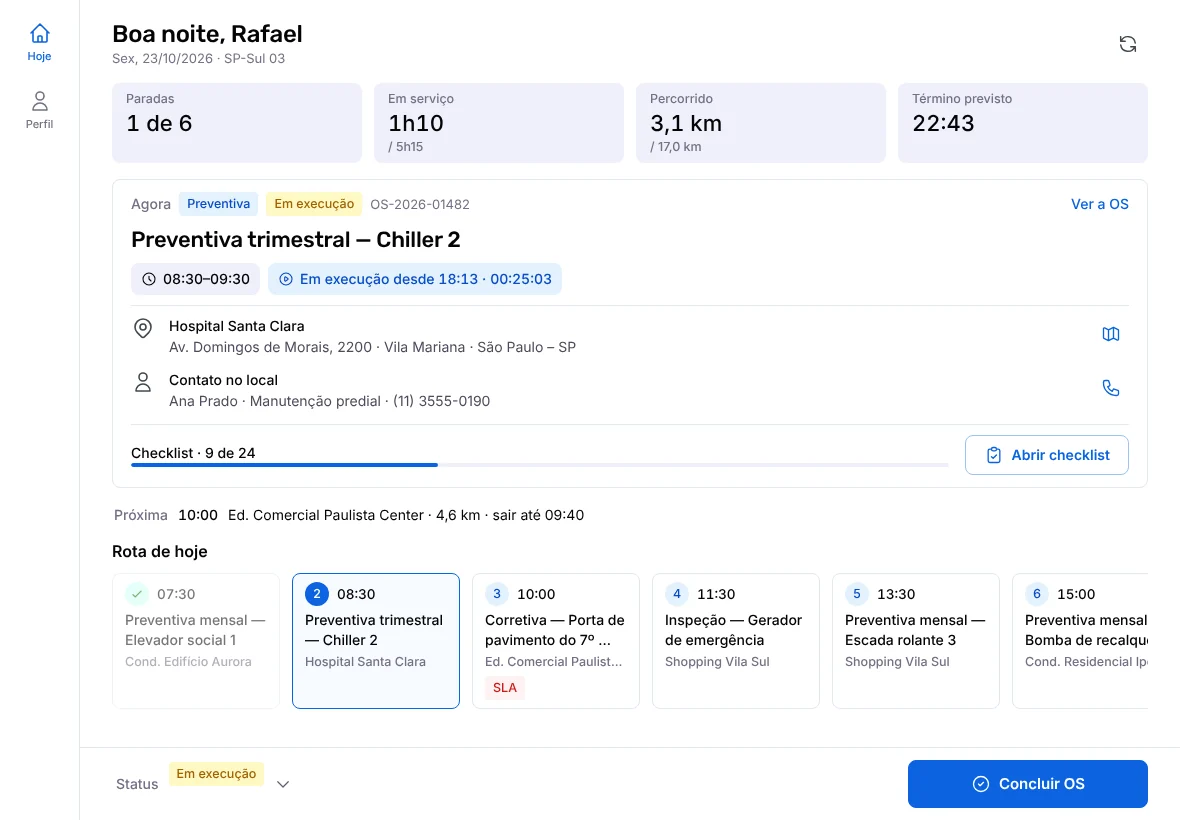
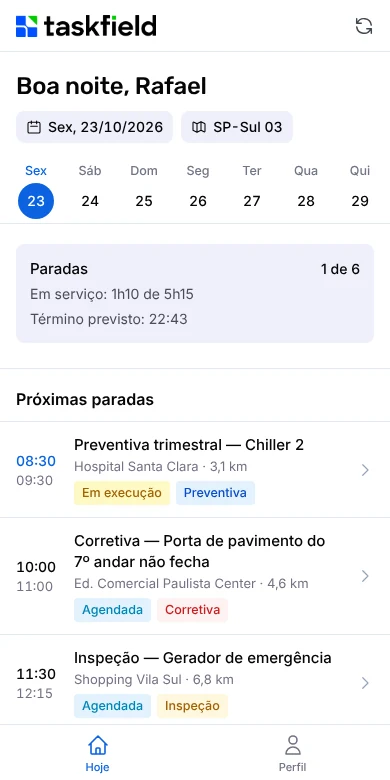
Little information per screen, little scrolling, and the next step always at the bottom. Technicians see the day's stops and the work order checklist; supervisors follow execution in real time.
- Daily agenda with the route and the next stop
- Grouped checklists with visible progress
- Works offline and syncs later
- Phone and tablet, Android and iOS
Industries
One CMMS for many kinds of maintenance
taskfield was born in elevator maintenance, one of the most demanding industries for response times and safety, and serves any operation with assets spread across the field.
-
Elevators and escalators
Monthly preventive visits per unit, service calls with SLAs and routes by region.
-
HVAC and refrigeration
Chillers, splits, rooftop units and cold rooms with checklists by model.
-
Manufacturing
Time- and usage-based plans, coded failures and history per asset.
-
Facilities and building maintenance
Buildings, systems and contracts in one place, with requests from occupants.
-
Energy: solar, substations and grids
Solar plants, substations and grids with crews spread across the field.
-
Telecom, towers and ISPs
Sites, towers, fiber and POPs with preventive and corrective maintenance.
-
Fleet and transportation
Mileage- and hour-based maintenance, vehicle inspections and history per vehicle.
-
Medical equipment and clinical engineering
Inventory, preventive maintenance, calibration and traceability for every intervention.
-
Water and wastewater utilities
Plants, lift stations and networks with field crews and mapped assets.
-
Agriculture
Farm machinery, irrigation and storage with hour meter-based preventive maintenance.
-
Oil and gas
Fuel stations, terminals, pipelines and plants with inspections and asset integrity.
-
Infrastructure: ports, airports and highways
Port, airport, highway and rail concessions with performance KPIs.
Blog
For teams that want maintenance with method
-
Management
What is a CMMS, and when the spreadsheet stops working
Assets, work and resources linked together, and the signs the spreadsheet has hit its limit.
-
Management
CMMS, EAM or ERP: which system fixes your maintenance
Three acronyms, three different questions, and five questions to decide.
-
Management
Spare parts inventory: how many of each part to keep
Reorder point for what moves, and the risk math for the critical spare.
FAQ
Frequently asked questions
What is taskfield?
A cloud-based maintenance management software (CMMS) with an app for field technicians. It covers asset records, preventive and corrective maintenance, route planning, checklists, materials and KPIs.
When does taskfield launch?
Launch is scheduled for March 1, 2027. Leave your email on this page to be notified.
Which companies is taskfield for?
Companies that run their own maintenance or provide maintenance services: elevators, facilities, manufacturing, medical equipment, HVAC, energy and other industries with assets in the field.
Does the technician app work offline?
Yes. Technicians check their agenda and fill in work orders without signal, and the data syncs when the connection comes back.
Does taskfield integrate with other systems?
Yes. taskfield provides a versioned API and webhooks to integrate with ERPs, legacy systems and monitoring devices.
Does taskfield use artificial intelligence?
Yes. AI analyzes work order history, failure codes and readings to spot repeat failures, suggest changes to preventive plans, anticipate failures from trends and answer questions about your operation in plain language. It also builds checklists from the forms your team already uses.
Which languages does taskfield support?
Portuguese, Spanish, English and German.
Get notified at launch
Leave your email and tell us about your operation. A person will reply, not a bot.